 28dac7c7f8
* fix: prevent silent memory loss on consolidation LLM failure

When all LLM retries are exhausted during consolidation, memories were
being marked consolidated_at unconditionally, permanently excluding them
from future consolidation runs without producing any observations.

Fix with two complementary mechanisms:
- Adaptive batch splitting: on LLM failure, the batch is halved and
  retried recursively down to batch_size=1, recovering most transient
  failures (rate limits, Pydantic validation on long prompts) without
  operator intervention
- consolidation_failed_at column: only single-memory batches that still
  fail after all retries are marked here instead of consolidated_at, so
  they remain visible and retryable
- New API endpoint POST /v1/default/banks/{bank_id}/consolidation/retry-failed
  resets these memories for the next consolidation run

* chore: regenerate OpenAPI spec

* fix: rename consolidation endpoint from /retry-failed to /recover

* fix: add consolidation_failed_at column, adaptive batch splitting, and recovery API

- Migration a3b4c5d6e7f8: add consolidation_failed_at TIMESTAMPTZ column to
  memory_units with an index for efficient failure queries; properly chains off
  g7h8i9j0k1l2 (backsweep_orphan_observations)
- Consolidator: filter pending memories with consolidation_failed_at IS NULL
  so failed memories are not re-fetched in an infinite loop
- Consolidator: adaptive batch splitting — when a batch exhausts all 3 LLM
  retries, halve it and retry sub-batches recursively; only single-memory
  batches that also exhaust all retries get consolidation_failed_at set
- New tests (9 total) covering: adaptive splitting recovers all memories,
  larger batch splitting, single-memory permanent failure, exclusion from
  next run, partial batch failure, recover resets columns, recover returns
  0 when none failed, recover-then-consolidate succeeds, HTTP endpoint

* chore: regenerate Go, Python, TypeScript clients with recover consolidation endpoint

* feat: add Recover Consolidation action to bank Actions dropdown

* style: apply ruff formatting to http.py and config.py

* fix: handle consolidation scope in large batch test mock LLM

The mock LLM was returning {"facts": ...} for ALL calls including consolidation.
Consolidation doesn't use skip_validation=True so it expects a _ConsolidationBatchResponse
instance, not a raw dict. Before this PR consolidation silently swallowed the AttributeError
(failed=False was returned); now failed=True triggers adaptive splitting and timeouts.

Fix: return _ConsolidationBatchResponse() when scope=="consolidation".

* fix: restrict claude-agent-sdk to macOS platform only (no Linux wheel available)

Also fix pre-existing type errors: use setattr for XLM-RoBERTa monkey-patch
and add missing reranker_local_fp16/bucket_batching/batch_size fields to main.py config constructor.

* fix: add UV_INDEX_STRATEGY=unsafe-best-match to fix markupsafe cp314 wheel conflict

PyTorch CPU index serves markupsafe==3.0.3 with only cp314 wheels.
uv's default first-index strategy stops at the first index with any version
even if no compatible wheel exists. unsafe-best-match searches all indices
for the best compatible wheel, falling back to PyPI for markupsafe.

* fix: use explicit pytorch index to prevent markupsafe wheel conflict

Configure the pytorch CPU index as explicit=true in pyproject.toml so it is
ONLY used for torch (via [tool.uv.sources]). All other packages (including
markupsafe) are resolved exclusively from PyPI, preventing the pytorch index
from serving incompatible cp314-only wheels for non-pytorch packages.

Remove UV_INDEX and UV_INDEX_STRATEGY from CI workflow (no longer needed
since the index is now configured in pyproject.toml).

* ci: trigger CI run

* ci: retry trigger

* ci: trigger after remote URL fix

* ci: add workflow_dispatch to unblock manual trigger

* fix: remove empty env blocks left after UV_INDEX removal

* fix: add type: ignore for optional claude_agent_sdk imports (macOS-only)

* fix: correct type: ignore rules for claude_agent_sdk and fix utcnow deprecation
|
||
|---|---|---|
| .githooks | ||
| .github | ||
| cookbook | ||
| docker | ||
| helm/hindsight | ||
| hindsight-all | ||
| hindsight-all-slim | ||
| hindsight-api | ||
| hindsight-api-slim | ||
| hindsight-cli | ||
| hindsight-clients | ||
| hindsight-control-plane | ||
| hindsight-dev | ||
| hindsight-docs | ||
| hindsight-embed | ||
| hindsight-integration-tests | ||
| hindsight-integrations | ||
| monitoring/grafana/dashboards | ||
| scripts | ||
| skills | ||
| .dockerignore | ||
| .env.example | ||
| .gitignore | ||
| .python-version | ||
| .sesskey | ||
| AGENTS.md | ||
| CLAUDE.md | ||
| CODE_OF_CONDUCT.md | ||
| CONTRIBUTING.md | ||
| hindsight-favicon.png | ||
| LICENSE | ||
| package-lock.json | ||
| package.json | ||
| pyproject.toml | ||
| README.md | ||
| SECURITY.md | ||
| uv.lock | ||







What is Hindsight?
Hindsight™ is an agent memory system built to create smarter agents that learn over time. Most agent memory systems focus on recalling conversation history. Hindsight is focused on making agents that learn, not just remember.
It eliminates the shortcomings of alternative techniques such as RAG and knowledge graph and delivers state-of-the-art performance on long term memory tasks.
Memory Performance & Accuracy
Hindsight is the most accurate agent memory system ever tested according to benchmark performance. It has achieved state-of-the-art performance on the LongMemEval benchmark, widely used to assess memory system performance across a variety of conversational AI scenarios. The current reported performance of Hindsight and other agent memory solutions as of January 2026 is shown here:

The benchmark performance data for Hindsight has been independently reproduced by research collaborators at the Virginia Tech Sanghani Center for Artificial Intelligence and Data Analytics and The Washington Post. Other scores are self-reported by software vendors.
Hindsight is being used in production at Fortune 500 enterprises and by a growing number of AI startups.
Adding Hindsight to Your AI Agents
The easiest way to use Hindsight with an existing agent is with the LLM Wrapper. You can add memory to your agent with 2 lines of code. That will swap your current LLM client out with the Hindsight wrapper. After that, memories will be stored and retrieved automatically as you make LLM calls.
If you need more control over how and when your agent stores and recalls memories, there's also a simple API you can integrate with using the SDKs or directly via HTTP.

🤖 Using a coding agent? Install the Hindsight documentation skill for instant access to docs while you code:
npx skills add https://github.com/vectorize-io/hindsight --skill hindsight-docsWorks with Claude Code, Cursor, and other AI coding assistants.
Quick Start
Docker (recommended)
export OPENAI_API_KEY=sk-xxx

docker run --rm -it --pull always -p 8888:8888 -p 9999:9999 \
  -e HINDSIGHT_API_LLM_API_KEY=$OPENAI_API_KEY \
  -v $HOME/.hindsight-docker:/home/hindsight/.pg0 \
  ghcr.io/vectorize-io/hindsight:latest
You can modify the LLM provider by setting HINDSIGHT_API_LLM_PROVIDER. Valid options are openai, anthropic, gemini, groq, ollama, lmstudio, and minimax. The documentation provides more details on supported models.
Docker (external PostgreSQL)
export OPENAI_API_KEY=sk-xxx
export HINDSIGHT_DB_PASSWORD=choose-a-password
cd docker/docker-compose
docker compose up
Client
pip install hindsight-client -U
# or
npm install @vectorize-io/hindsight-client
Python
from hindsight_client import Hindsight

client = Hindsight(base_url="http://localhost:8888")

# Retain: Store information
client.retain(bank_id="my-bank", content="Alice works at Google as a software engineer")

# Recall: Search memories
client.recall(bank_id="my-bank", query="What does Alice do?")

# Reflect: Generate disposition-aware response
client.reflect(bank_id="my-bank", query="Tell me about Alice")
Node.js / TypeScript
npm install @vectorize-io/hindsight-client
const { HindsightClient } = require('@vectorize-io/hindsight-client');

const main = async () => {
  const client = new HindsightClient({ baseUrl: 'http://localhost:8888' });

  await client.retain('my-bank', 'Alice loves hiking in Yosemite');

  const results = await client.recall('my-bank', 'What does Alice like?');
  console.log(results);
}

main();
Python Embedded (no server required)
pip install hindsight-all -U
import os
from hindsight import HindsightServer, HindsightClient

with HindsightServer(
    llm_provider="openai",
    llm_model="gpt-5-mini",
    llm_api_key=os.environ["OPENAI_API_KEY"]
) as server:
    client = HindsightClient(base_url=server.url)
    client.retain(bank_id="my-bank", content="Alice works at Google")
    results = client.recall(bank_id="my-bank", query="Where does Alice work?")
Use Cases
Hindsight is built to support conversational AI agents as well as agents that are intended to perform tasks autonomously. The ideal use case for Hindsight are agents that require a blend of these features such as AI employees that need to handle open-ended tasks, change behavior based on user feedback, and learn to perform complex tasks to automate work at a level that approximates a human work. Hindsight can be used with simple AI workflows like those built with n8n and other similar tools, but may be overkill for such applications.
Per-User Memories and Chat History
One of the simpler use cases you can use Hindsight for is to personalize AI chatbots and other conversational agents by storing and recalling memories associated with individual users.
The requirements for this use case usually look something like this:
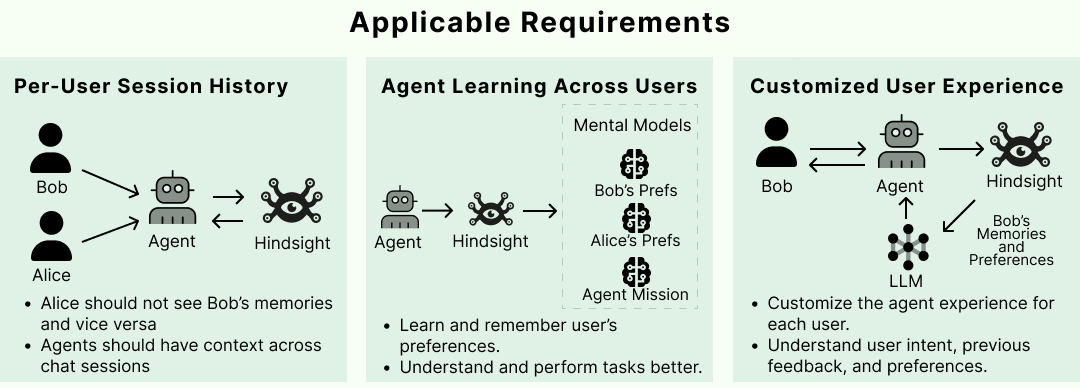
Satisfying these requirements in Hindsight is straightforward. When new user inputs and tool calls are ingested into Hindsight using the retain operation, custom metadata can be used to enrich the new memories. Metadata provides a convenient way to isolate memories that need to be restricted to a given user. Once these are fed into the retain operation, any raw memories and mental models that get created can be filtered when retrieving relevant memories.

Architecture & Operations

Most agent memory implementations rely on basic vector search or sometimes use a knowledge graph. Hindsight uses biomimetic data structures to organize agent memories in a way that is more like how human memory works:
- World: Facts about the world ("The stove gets hot")
- Experiences: Agent's own experiences ("I touched the stove and it really hurt")
- Mental Models: Learned understanding of the agent's world formed by reflecting on raw memories and experiences.
Memories in Hindsight are stored in banks (i.e. memory banks). When memories are added to Hindsight, they are pushed into either the world facts or experiences memory pathway. They are then represented as a combination of entities, relationships, and time series with sparse/dense vector representations to aid in later recall.
Hindsight provides three simple methods to interact with the system:
- Retain: Provide information to Hindsight that you want it to remember
- Recall: Retrieve memories from Hindsight
- Reflect: Reflect on memories and experiences to generate new observations and insights from existing memories.
Retain
The retain operation is used to push new memories into Hindsight. It tells Hindsight to retain the information you pass in as an input.
from hindsight_client import Hindsight

client = Hindsight(base_url="http://localhost:8888")

# Simple
client.retain(
    bank_id="my-bank",
    content="Alice works at Google as a software engineer"
)

# With context and timestamp
client.retain(
    bank_id="my-bank",
    content="Alice got promoted to senior engineer",
    context="career update",
    timestamp="2025-06-15T10:00:00Z"
)
Behind the scenes, the retain operation uses an LLM to extract key facts, temporal data, entities, and relationships. It passes these through a normalization process to transform extracted data into canonical entities, time series, and search indexes along with metadata. These representations create the pathways for accurate memory retrieval in the recall and reflect operations.

Recall
The recall operation is used to retrieve memories. These memories can come from any of the memory types (world, experiences, etc.)
from hindsight_client import Hindsight

client = Hindsight(base_url="http://localhost:8888")

# Simple
client.recall(bank_id="my-bank", query="What does Alice do?")

# Temporal
client.recall(bank_id="my-bank", query="What happened in June?")
Recall performs 4 retrieval strategies in parallel:
- Semantic: Vector similarity
- Keyword: BM25 exact matching
- Graph: Entity/temporal/causal links
- Temporal: Time range filtering

The individual results from the retrievals are merged, then ordered by relevance using reciprocal rank fusion and a cross-encoder reranking model.
The final output is trimmed as needed to fit within the token limit.
Reflect
The reflect operation is used to perform a more thorough analysis of existing memories. This allows the agent to form new connections between memories and build a more thorough understanding of its world.
For example, the reflect operation can be used to support use cases such as:
- An AI Project Manager reflecting on what risks need to be mitigated on a project.
- A Sales Agent reflecting on why certain outreach messages have gotten responses while others haven't.
- A Support Agent reflecting on opportunities where customers have questions not answered by current product documentation.
The reflect operation can also be used to handle on-demand question answering or analysis which require more deep thinking.
from hindsight_client import Hindsight

client = Hindsight(base_url="http://localhost:8888")

client.reflect(bank_id="my-bank", query="What should I know about Alice?")

Resources
Documentation:
Clients:
Community:
Star History
Contributing
See CONTRIBUTING.md.
License
MIT — see LICENSE
Built by Vectorize.io