 69dec8ec34
* feat: add comprehensive OpenTelemetry tracing - Add tool execution spans for reflect operations - Add tool call information (names, params) to spans - Change verification scope from 'test' to 'verification' - Add hindsight.reflect_generation span for done() processing - Implement no-op tracer for improved code readability - Update documentation for OTEL configuration - Resolve merge conflicts from rebase * fix: properly serialize Pydantic models in span recording - Add _serialize_for_span() helper to handle Pydantic models - Update all providers to use the helper function - Fixes test failures with 'Object of type X is not JSON serializable' * feat: add Grafana LGTM stack for unified local observability Add Grafana LGTM (Loki, Grafana, Tempo, Mimir) as the recommended local development observability stack. This provides traces, metrics, and logs in a single Docker container instead of separate tools. Changes: - Add scripts/dev/grafana/ with docker-compose and README - Add scripts/dev/start-grafana.sh startup script - Update .env.example to reference Grafana LGTM - Update configuration docs to emphasize Grafana LGTM as primary option - Reorder OTLP backend list to show Grafana LGTM first Benefits: - Single container vs multiple separate tools (Jaeger, SigNoz, etc.) - ~515MB image with full observability stack - Compatible with existing OTLP configuration - Simpler local development setup * chore: remove SigNoz scripts and references Remove SigNoz observability stack in favor of Grafana LGTM as the sole recommended local development tracing solution. Changes: - Delete scripts/dev/signoz/ directory and all SigNoz configurations - Delete scripts/dev/start-signoz.sh startup script - Remove SigNoz references from .env.example - Remove SigNoz from OTLP backends list in configuration docs Grafana LGTM provides the same capabilities (traces, metrics, logs) in a simpler single-container setup. * feat: add consolidation span hierarchy for tracing Add parent-child span structure for consolidation operations: - hindsight.consolidation: Parent span for each memory being processed - hindsight.consolidation_recall: Child span for finding related observations - LLM call span: Automatically created by LLM provider (scope="consolidation") This enables detailed timing breakdown in Grafana Tempo: - Total consolidation time per memory - Time spent in recall - Time spent in LLM call - Time spent executing actions (create/update) All consolidation tests pass (31/31). * feat: add Prometheus metrics and GenAI dashboard to Grafana stack Add comprehensive metrics and dashboarding to the Grafana LGTM stack: Metrics Collection: - Configure Prometheus to scrape Hindsight API /metrics endpoint - Scrape interval: 10 seconds - Targets hindsight-api on host.docker.internal:8888 GenAI Dashboard: - Pre-configured dashboard with 6 panels: - LLM call rate (by provider/model) - LLM call duration (p50/p95 by scope) - Token usage - input tokens/sec by scope - Token usage - output tokens/sec by scope - Operations rate (retain/recall/reflect/consolidation) - Operation duration p95 by operation type Configuration: - Mount prometheus.yml for metrics scraping - Mount dashboards directory for auto-provisioning - Add host.docker.internal mapping for container->host access - Dashboard provisioning with auto-reload every 10s Documentation: - Updated README with metrics viewing instructions - Added PromQL query examples - Documented dashboard access and navigation This provides full observability: traces (Tempo) + metrics (Prometheus/Mimir) + dashboards (Grafana) * refactor: merge Grafana setup into existing monitoring stack Consolidate the separate scripts/dev/grafana/ setup into the existing scripts/dev/monitoring/ stack, using Grafana LGTM (Loki, Grafana, Tempo, Mimir). Changes: - Remove separate scripts/dev/grafana/ directory and start-grafana.sh - Rewrite scripts/dev/monitoring/start.sh to use Docker + Grafana LGTM (was: download native Prometheus/Grafana binaries) - Add docker-compose.yaml for Grafana LGTM container - Add prometheus.yml for scraping Hindsight API metrics - Mount existing dashboards from monitoring/grafana/dashboards/ - Add comprehensive README.md Benefits: - Single unified monitoring command: ./scripts/dev/start-monitoring.sh - Uses existing dashboard files (hindsight-operations, hindsight-llm, hindsight-api-service) - Simpler setup: Docker-based vs downloading/running native binaries - Full observability: traces + metrics + logs + dashboards in one container - Standard ports: Grafana on 3000, OTLP on 4317/4318 Architecture: - Grafana LGTM container (~515MB) provides all components - Dashboards auto-provisioned from monitoring/grafana/dashboards/ - Prometheus scrapes host.docker.internal:8888/metrics - Shared hindsight-network for future service-to-service tracing * fix: run monitoring stack in foreground for easy Ctrl+C stop Change docker-compose from detached (-d) to foreground mode. Users can now stop the stack with Ctrl+C instead of needing to run docker-compose down separately. * fix: remove invalid home dashboard path and obsolete version field - Remove GF_DASHBOARDS_DEFAULT_HOME_DASHBOARD_PATH environment variable (was pointing to wrong path causing 'Failed to load home dashboard' error) - Remove obsolete 'version' field from docker-compose.yaml (docker-compose v2+ doesn't require version field) * fix: load Hindsight dashboards in Grafana LGTM Mount Hindsight dashboard JSON files and custom provisioning config to make dashboards visible in Grafana. Changes: - Mount hindsight-operations.json, hindsight-llm.json, hindsight-api-service.json to /otel-lgtm/ - Create grafana-dashboards.yaml with all dashboard providers (default + Hindsight) - Mount custom provisioning config to override LGTM default All 3 Hindsight dashboards now appear in Grafana UI with metrics from Prometheus scraping the Hindsight API /metrics endpoint. * fix: configure Prometheus to scrape Hindsight API metrics Update prometheus.yml to include both OTLP receiver config (from LGTM) and scrape_configs for pulling metrics from Hindsight API. Changes: - Mount prometheus.yml to /otel-lgtm/prometheus.yaml (where LGTM reads it) - Add scrape_configs section to pull from host.docker.internal:8888/metrics - Keep OTLP receiver configuration for trace metrics - Set scrape_interval to 5s Verified: Prometheus now successfully scrapes hindsight_llm_calls_total and other Hindsight metrics. Dashboards now show live data! * feat: add comprehensive tracing for recall and improve reflect/mental_model_refresh spans - Add recall operation tracing with parent-child span hierarchy - Parent: hindsight.recall with attributes (bank_id, query, fact_types, etc.) - Children: recall_embedding, recall_retrieval, recall_fusion, recall_rerank - Fixed context propagation using start_as_current_span() - Improve reflect tracing spans - Remove reflect_generation spans, use reflect instead - Change done() tool processing to hindsight.reflect_tool_call - Fix mental_model_refresh span nesting - Add _skip_span parameter to reflect_async to avoid duplicate hindsight.reflect spans - Mental model refresh now has clean span hierarchy without nested reflect parent - Add comprehensive tracing verification tests - Test span hierarchy and attributes for all operations - Verify parent-child relationships - 5 passing tests covering recall, reflect, consolidation, and mental_model_refresh * refactor: remove redundant is_tracing_enabled() checks - Remove all is_tracing_enabled() conditional checks before tracing calls - NoOpTracer/NoOpSpan handle disabled tracing automatically - Simplify code by always calling tracer methods directly - Fix NoOpTracer.start_as_current_span() to yield NoOpSpan instead of None Changes: - memory_engine.py: Remove 5 is_tracing_enabled checks in recall spans - agent.py: Remove 2 is_tracing_enabled checks in reflect tool spans - tracing.py: Fix NoOpTracer context manager to yield proper NoOpSpan This eliminates ~50 lines of redundant conditional code while maintaining identical behavior. * docs: simplify distributed tracing section in monitoring.md - Make tracing documentation more concise - Focus on span hierarchy and attributes - Remove verbose troubleshooting and performance sections - Keep configuration.md for env vars only |
||
|---|---|---|
| .githooks | ||
| .github | ||
| cookbook | ||
| docker | ||
| helm/hindsight | ||
| hindsight | ||
| hindsight-api | ||
| hindsight-cli | ||
| hindsight-clients | ||
| hindsight-control-plane | ||
| hindsight-dev | ||
| hindsight-docs | ||
| hindsight-embed | ||
| hindsight-integration-tests | ||
| hindsight-integrations | ||
| monitoring/grafana/dashboards | ||
| scripts | ||
| skills | ||
| .dockerignore | ||
| .env.example | ||
| .gitignore | ||
| .python-version | ||
| .sesskey | ||
| AGENTS.md | ||
| CLAUDE.md | ||
| CODE_OF_CONDUCT.md | ||
| CONTRIBUTING.md | ||
| hindsight-favicon.png | ||
| LICENSE | ||
| package-lock.json | ||
| package.json | ||
| pyproject.toml | ||
| README.md | ||
| SECURITY.md | ||
| uv.lock | ||







What is Hindsight?
Hindsight™ is an agent memory system built to create smarter agents that learn over time. Most agent memory systems focus on recalling conversation history. Hindsight is focused on making agents that learn, not just remember.
It eliminates the shortcomings of alternative techniques such as RAG and knowledge graph and delivers state-of-the-art performance on long term memory tasks.
Memory Performance & Accuracy
Hindsight is the most accurate agent memory system ever tested according to benchmark performance. It has achieved state-of-the-art performance on the LongMemEval benchmark, widely used to assess memory system performance across a variety of conversational AI scenarios. The current reported performance of Hindsight and other agent memory solutions as of January 2026 is shown here:
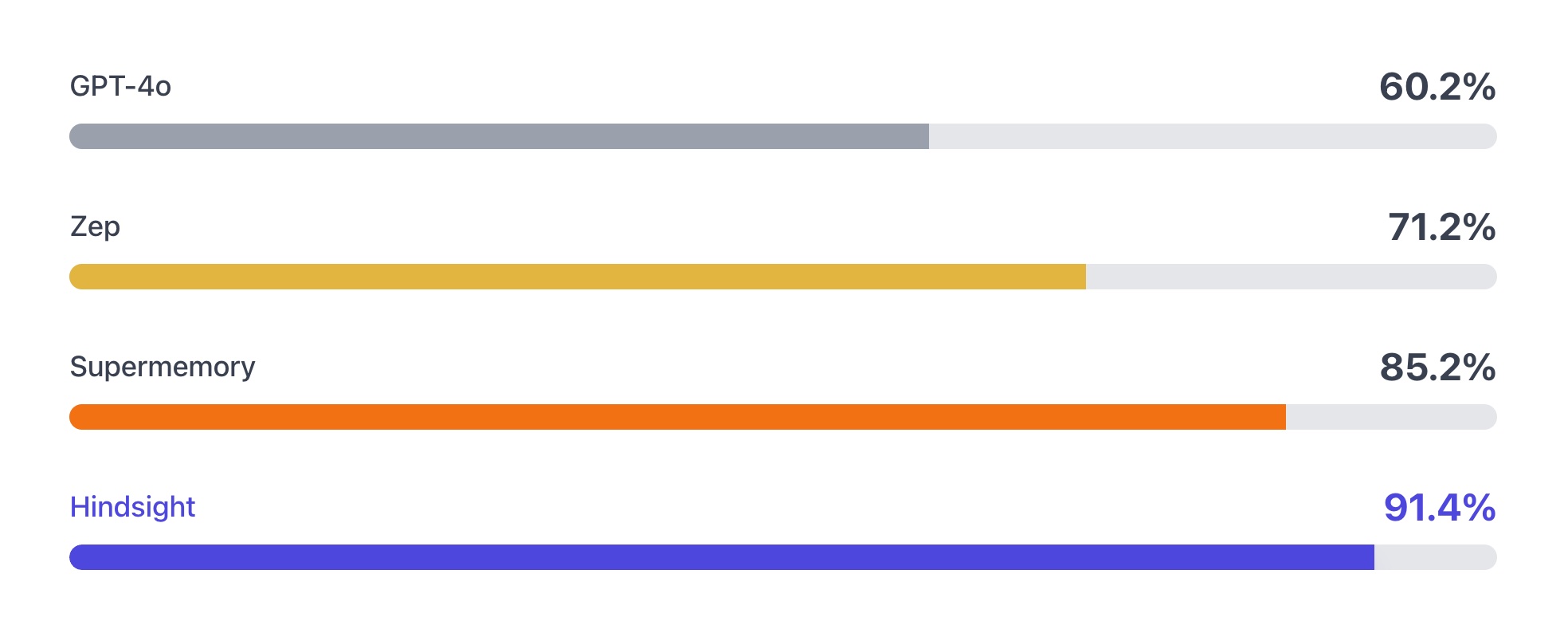
The benchmark performance data for Hindsight has been independently reproduced by research collaborators at the Virginia Tech Sanghani Center for Artificial Intelligence and Data Analytics and The Washington Post. Other scores are self-reported by software vendors.
Hindsight is being used in production at Fortune 500 enterprises and by a growing number of AI startups.
Adding Hindsight to Your AI Agents
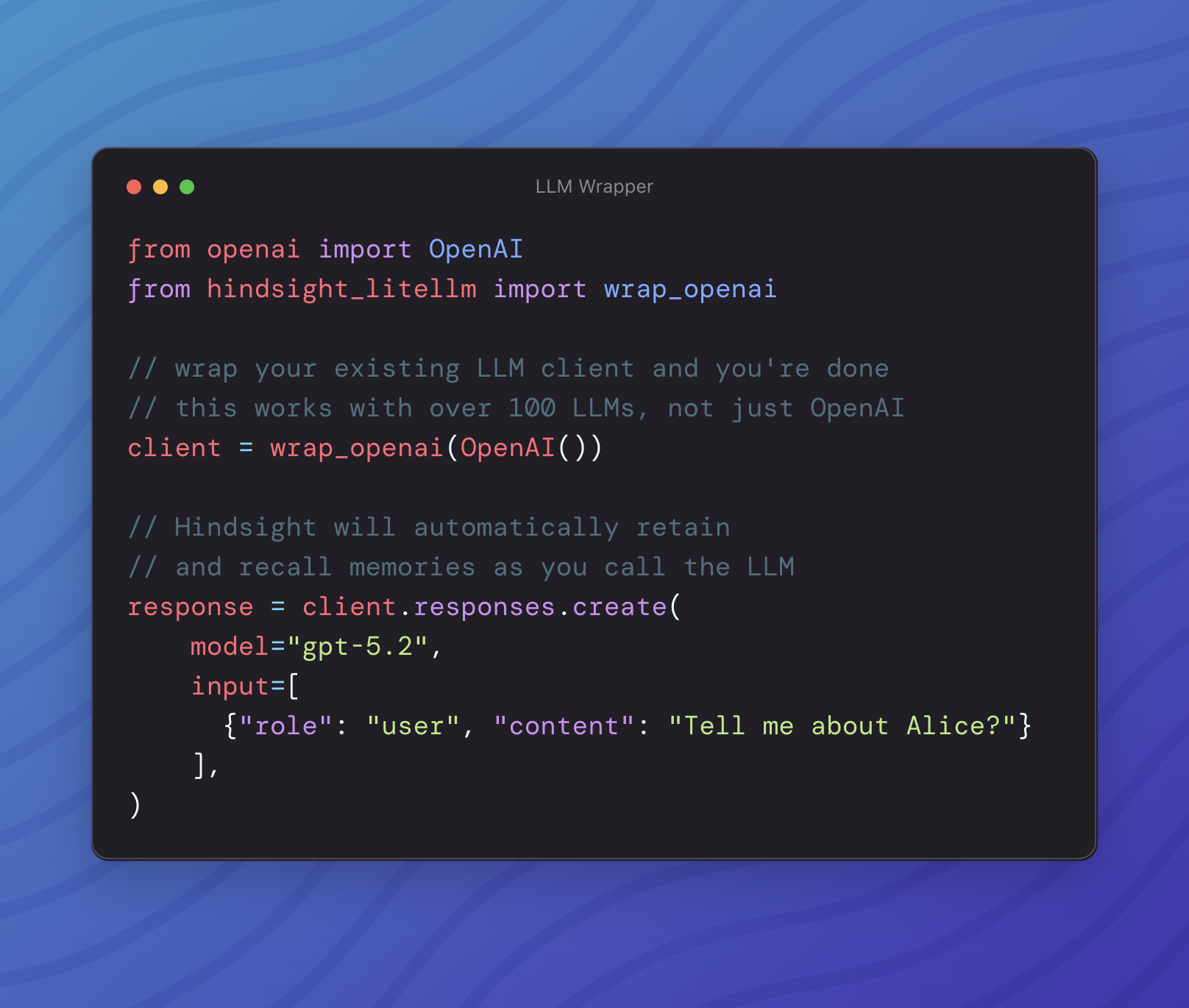
The easiest way use Hindsight with an existing agent is with the LLM Wrapper. You can add memory to your agent with 2 lines of code. That will swap your current LLM client out with the Hindsight wrapper. After that, memories will be stored and retrieved automatically as you make LLM calls.
If you need more control over how and when your agent stores and recalls memories, there's also a simple API you can integrate with using the SDKs or directly via HTTP.
Quick Start
Docker (recommended)
export OPENAI_API_KEY=sk-xxx

docker run --rm -it --pull always -p 8888:8888 -p 9999:9999 \
  -e HINDSIGHT_API_LLM_API_KEY=$OPENAI_API_KEY \
  -v $HOME/.hindsight-docker:/home/hindsight/.pg0 \
  ghcr.io/vectorize-io/hindsight:latest
You can modify the LLM provider by setting HINDSIGHT_API_LLM_PROVIDER. Valid options are openai, anthropic, gemini, groq, ollama, and lmstudio. The documentation provides more details on supported models.
Docker (external PostgreSQL)
export OPENAI_API_KEY=sk-xxx
export HINDSIGHT_DB_PASSWORD=choose-a-password
cd docker/docker-compose
docker compose up
Client
pip install hindsight-client -U
# or
npm install @vectorize-io/hindsight-client
Python
from hindsight_client import Hindsight

client = Hindsight(base_url="http://localhost:8888")

# Retain: Store information
client.retain(bank_id="my-bank", content="Alice works at Google as a software engineer")

# Recall: Search memories
client.recall(bank_id="my-bank", query="What does Alice do?")

# Reflect: Generate disposition-aware response
client.reflect(bank_id="my-bank", query="Tell me about Alice")
Node.js / TypeScript
npm install @vectorize-io/hindsight-client
const { HindsightClient } = require('@vectorize-io/hindsight-client');

const main = async () => {
  const client = new HindsightClient({ baseUrl: 'http://localhost:8888' });

  await client.retain('my-bank', 'Alice loves hiking in Yosemite');

  const results = await client.recall('my-bank', 'What does Alice like?');
  console.log(results);
}

main();
Python Embedded (no server required)
pip install hindsight-all -U
import os
from hindsight import HindsightServer, HindsightClient

with HindsightServer(
    llm_provider="openai",
    llm_model="gpt-5-mini",
    llm_api_key=os.environ["OPENAI_API_KEY"]
) as server:
    client = HindsightClient(base_url=server.url)
    client.retain(bank_id="my-bank", content="Alice works at Google")
    results = client.recall(bank_id="my-bank", query="Where does Alice work?")
Use Cases
Hindsight is built to support conversational AI agents as well as agents that are intended to perform tasks autonomously. The ideal use case for Hindsight are agents that require a blend of these features such as AI employees that need to handle open-ended tasks, change behavior based on user feedback, and learn to perform complex tasks to automate work at a level that approximates a human work. Hindsight can be used with simple AI workflows like those built with n8n and other similar tools, but may be overkill for such applications.
Per-User Memories and Chat History
One of the simpler use cases you can use Hindsight for is to personalize AI chatbots and other conversational agents by storing and recalling memories associated with individual users.
The requirements for this use case usually look something like this:

Satisfying these requirements in Hindsight is straightforward. When new user inputs and tool calls are ingested into Hindsight using the retain operation, custom metadata can be used to enrich the new memories. Metadata provides a convenient way to isolate memories that need to be restricted to a given user. Once these are fed into the retain operation, any raw memories and mental models that get created can be filtered when retrieving relevant memories.

Architecture & Operations

Most agent memory implementation rely on basic vector search or sometimes use a knowledge graph. Hindsight uses biomimetic data structures to organize agent memories in a way that is more like how human memory works:
- World: Facts about the world ("The stove gets hot")
- Experiences: Agent's own experiences ("I touched the stove and it really hurt")
- Mental Models: Learned understanding of the agent's world formed by reflecting on raw memories and experiences.
Memories in Hindsight are stored in banks (i.e. memory banks). When memories are added to Hindsight, they are pushed into either the world facts or experiences memory pathway. They are then represented as a combination of entities, relationships, and time series with sparse/dense vector representations to aid in later recall.
Hindsight provides three simple methods to interact with the system:
- Retain: Provide information to Hindsight that you want it to remember
- Recall: Retrieve memories from Hindsight
- Reflect: Reflect on memories and experiences to generate new observations and insights from existing memories.
Retain
The retain operation is used to push new memories into Hindsight. It tells Hindsight to retain the information you pass in as an input.
from hindsight_client import Hindsight

client = Hindsight(base_url="http://localhost:8888")

# Simple
client.retain(
    bank_id="my-bank",
    content="Alice works at Google as a software engineer"
)

# With context and timestamp
client.retain(
    bank_id="my-bank",
    content="Alice got promoted to senior engineer",
    context="career update",
    timestamp="2025-06-15T10:00:00Z"
)
Behind the scenes, the retain operation uses an LLM to extract key facts, temporal data, entities, and relationships. It passes these through a normalization process to transform extracted data into canonical entities, time series, and search indexes along with metadata. These representations create the pathways for accurate memory retrieval in the recall and reflect operations.

Recall
The recall operation is used to retrieve memories. These memories can come from any of the memory types (world, experiences, etc.)
from hindsight_client import Hindsight

client = Hindsight(base_url="http://localhost:8888")

# Simple
client.recall(bank_id="my-bank", query="What does Alice do?")

# Temporal
client.recall(bank_id="my-bank", query="What happened in June?")
Recall performs 4 retrieval strategies in parallel:
- Semantic: Vector similarity
- Keyword: BM25 exact matching
- Graph: Entity/temporal/causal links
- Temporal: Time range filtering
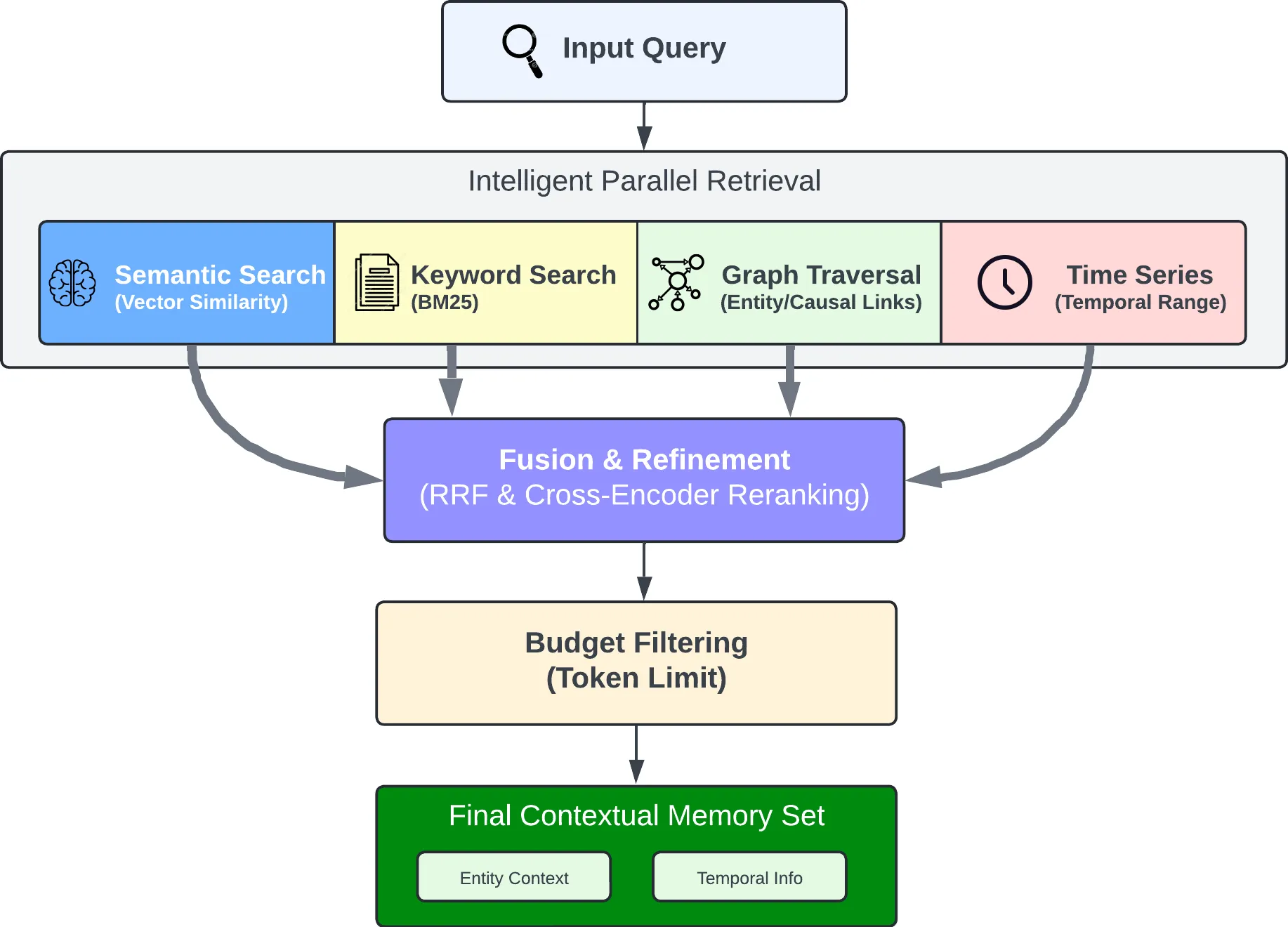
The individual results from the retrievals are merged, then ordered by relevance using reciprocal rank fusion and a cross-encoder reranking model.
The final output is trimmed as needed to fit within the token limit.
Reflect
The reflect operation is used to perform a more thorough analysis of existing memories. This allows the agent to form new connections between memories and build a more thorough understanding of its world.
For example, the reflect operation can be used to support use cases such as:
- An AI Project Manager reflecting on what risks need to be mitigated on a project.
- A Sales Agent reflecting on why certain outreach messages have gotten responses while others haven't.
- A Support Agent reflecting on opportunities where customers have questions not answered by current product documentation.
The reflect operation can also be used to handle on-demand question answering or analysis which require more deep thinking.
from hindsight_client import Hindsight

client = Hindsight(base_url="http://localhost:8888")

client.reflect(bank_id="my-bank", query="What should I know about Alice?")

Resources
Documentation:
Clients:
Community:
Star History
Contributing
See CONTRIBUTING.md.
License
MIT — see LICENSE
Built by Vectorize.io